Researchers at QiAnXin XLab have reported a large campaign in which compromised Ghost CMS websites were used to show fake Cloudflare or CAPTCHA-style verification prompts. The important detail for anyone who lands on one of these pages is the browser-facing lure: a legitimate-looking site can suddenly ask you to run a Windows command to “verify” yourself.
That is not how a real CAPTCHA works. If a website asks you to press Win+R, paste a command, open PowerShell, or run a downloaded file to prove you are human, close the page and treat the prompt as malicious.
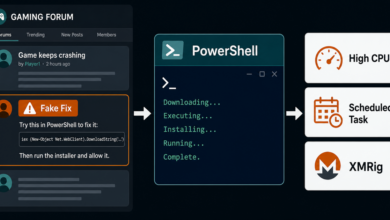
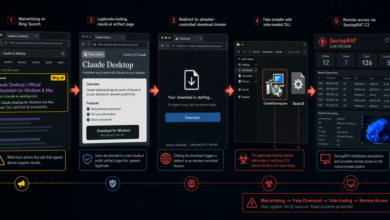
The same rule applies to fake software repositories: if a page asks you to paste a command to install a tool, stop and verify the source. See the related note on fake ChatGPT and Claude installers spreading a Deno RAT.
What Happened
XLab said attackers exploited CVE-2026-26980, a Ghost CMS Content API SQL injection flaw, to steal Admin API keys from unpatched sites. With those keys, the attackers could modify published articles in bulk and append malicious JavaScript loaders to legitimate pages.
The campaign was first detected on May 7, 2026, and XLab reported more than 700 affected domains across universities, personal blogs, media sites, fintech, AI/SaaS companies, security sites, and other trusted web properties. Public reporting named high-profile victims such as Harvard University, Oxford University, Auburn University, and DuckDuckGo, but the reader-facing lesson is broader: a trusted domain can still be temporarily poisoned if its publishing system is compromised.
The Ghost flaw was not a brand-new zero-day at the time of mass abuse. The GitHub advisory for Ghost says versions 3.24.0 through 6.19.0 were affected and that version 6.19.1 fixed the issue in February 2026.
How the Fake Verification Flow Worked
The injected code acted as a loader. XLab described a second-stage script fetched from infrastructure such as clo4shara[.]xyz/11z77u3.php. That script collected browser fingerprinting details and used cloaking logic so scanners or researchers might see something different from a real visitor.
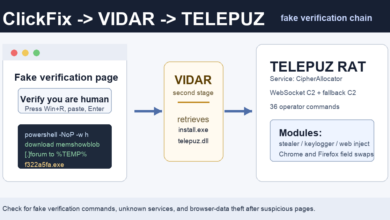
When a visitor passed the campaign’s checks, the page could show a fake Cloudflare or CAPTCHA verification box in an iframe. Instead of a normal checkbox challenge, the lure pushed a ClickFix-style instruction: copy a command, open the Windows Run dialog, paste it, and execute it.
XLab observed multiple payload paths, including DLL loaders, JavaScript droppers, and an Electron-based malware sample named UtilifySetup.exe. In one chain, the command downloaded a ZIP archive, ran a batch script, used PowerShell to fetch a DLL, launched it with rundll32.exe, and then opened a harmless-looking page as a distraction. Later payloads included a modified Grape desktop client that contacted web-telegram[.]ug.
Why This Matters to Users Seeing Pop-ups or Redirects
This campaign is not the same as a normal browser notification scam, but it uses the same trust problem. A user lands on a page, sees a familiar verification pattern, and is pressured to complete a small action before thinking about what the action really does.
The Browser Notification Scam Removal Guide is still the right starting point when the symptom is unwanted notifications after clicking Allow. The Pop-up Ads and Browser Notifications hub is useful when redirects or fake alerts keep returning. This Ghost CMS campaign adds another check: if the page asks you to run a local command, it has moved beyond browser permission abuse into malware installation.
Warning Signs to Check
The clearest warning sign is any verification page that leaves the browser. Real Cloudflare, reCAPTCHA, and browser security checks do not need you to open Windows Run, Terminal, Command Prompt, PowerShell, or a downloaded installer.
Other red flags include instructions to paste hidden clipboard text, a fake “verification code” that looks like a command, a page that claims the browser is broken, or a verification prompt that appears on top of an otherwise ordinary article. The domain in the address bar may be legitimate if the site itself was compromised, so judge the requested action, not only the domain name.
What to Do Now
If you only saw the prompt and did not run anything, close the tab. If the page keeps reopening, clear that browser session and check notification permissions. In Chrome or Microsoft Edge, open Settings > Privacy and security > Site settings > Notifications and remove unknown domains from the Allow list. In Chrome on Android, open Settings > Site settings > Notifications. In Safari on macOS, use Safari > Settings > Websites > Notifications.
If you pasted and ran the command, assume the device may be infected. Disconnect from sensitive accounts, run a reputable malware scan, check recent downloads and startup items, and change passwords from a clean device. Pay special attention to browser-stored passwords, session cookies, cryptocurrency wallets, and accounts used on the same Windows profile.
If your main symptom is still recurring ads, fake virus alerts, or redirect pages rather than a command prompt, treat it as a browser or adware cleanup issue first. The What Is Adware? guide explains how unwanted ads can come from extensions, installed apps, or compromised ad flows. The earlier fake CAPTCHA SMS scam article covers a different variation where a fake CAPTCHA tried to move users into sending costly text messages.
Do Not Overreact to Cloudflare or Ghost Names
Cloudflare verification pages, Ghost CMS, and university or company websites are not automatically malicious. The abuse happens when attackers compromise a site or imitate a trusted verification pattern. A real anti-bot challenge stays in the browser and does not ask you to run system commands.
The practical rule is narrow and reliable: do not run commands from web pages, even if the page claims it is a CAPTCHA, browser fix, update, or security check. Close the page, open the site again from a fresh tab, and search for an official notice if you are unsure.
Quick Takeaway
A fake Cloudflare or CAPTCHA prompt that asks for Win+R, PowerShell, Terminal, or a pasted command is a malware lure, not a verification step. Close it. If you already ran the command, treat the device as compromised and scan it before using passwords or payment accounts again.
Related warning: Trusted-looking pages can still become the first step in a malware lure. A newer LLMShare campaign uses real ChatGPT share links to show fake outage pages and push desktop downloads. See the update on ChatGPT share-link fake outage downloads.
Related fake-CAPTCHA update: Hijacked sites are still being used for ClickFix-style command lures. A newer Unit 42 report describes JokerStat pages injected into WordPress sites with blockchain-based C2 and screenshot telemetry. See the report on JokerStat fake CAPTCHA pages.
References
- QiAnXin XLab: Ghost CMS Mass Compromised via CVE-2026-26980, Now Fueling ClickFix Attacks
- GitHub Advisory Database: SQL injection in Ghost Content API
Related: Drive-by ClickFix abuse is not limited to fake CAPTCHA pages. A newer campaign, DriveSurge, also uses compromised sites to route visitors toward fake browser updates and command-paste lures.
For a newer example of the same command-paste tactic, see the report on fake Google and Cloudflare checks pushing ResiLoader and stealers.
Related Mac update: The same fake-CAPTCHA idea now has a macOS coercion variant: ClickLock can pressure users into entering their Mac password.