Security researchers have named a new large-scale drive-by malware operation DriveSurge, after finding that compromised legitimate websites are being used to route visitors toward fake browser updates and ClickFix-style command lures.
The important part for everyday users is the delivery method. A page can look like a normal business, local organization, or professional services website, while hidden JavaScript quietly sends some visitors through a traffic distribution system. From there, the visitor may see a browser update download page, a fake technical error, or a prompt that tries to make them paste a command into PowerShell, Terminal, or another system tool.
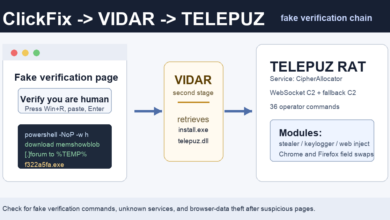
Related fake-verification case: ClickFix lures continue to move beyond simple fake browser updates. A newer Elastic report shows TELEPUZ spreading through a ClickFix-to-VIDAR chain; see the TELEPUZ malware overview.
What DriveSurge Is Doing
Silent Push reported on May 30, 2026 that DriveSurge has compromised thousands of sites and uses zTDS infrastructure to steer visitors into two common social-engineering paths: FakeUpdates pages and ClickFix prompts. The user-facing risk is straightforward: a trusted site can become the launch point for a malware delivery flow.
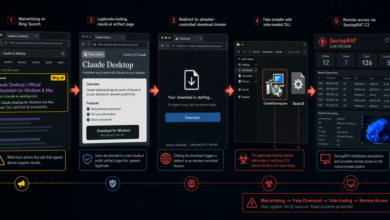
Silent Push said one fake update chain served a page through check[.]first-node[.]rocks and offered a ZIP download containing Browser Update[.]exe. The same research described browser impersonation covering Chrome, Firefox, Edge, Safari, Opera, Brave, Vivaldi, Samsung Internet, UC Browser, Yandex Browser, and a generic “Other” category.
The ClickFix branch is different but just as risky. Instead of asking for a download, it presents a fake error or verification step and instructs the user to copy and run a command. Silent Push observed a ClickFix instance attempting to pull malicious code from 91.92.240[.]127. Its macOS analysis also described clipboard replacement and Terminal instructions that turn a fake verification step into malware execution.
Why This Is Different From a Normal Pop-Up
Many adware and browser notification scams rely on obviously suspicious domains. DriveSurge is more deceptive because the first page may be a real website the visitor already trusts. The malicious part happens behind the page, through injected scripts and routing logic.
That makes the warning signs more behavioral than domain-based:
- A website suddenly says your browser must be updated before you can continue.
- The “update” arrives as a ZIP, EXE, script, or unfamiliar installer instead of through the browser’s own update menu.
- A verification page tells you to press Win+R, open PowerShell, open Terminal, or paste a command.
- A CAPTCHA or repair prompt copies something to your clipboard and then tells you to paste it elsewhere.
- The page claims a system scan, browser check, or security repair is incomplete even though you did not start one.
Quick Check Before You Click
If a site unexpectedly offers a browser update, close the tab and update the browser from its built-in menu or from the vendor’s official site. Do not install a browser update delivered as a ZIP from a random web page.
If a page tells you to paste a command, stop. Real CAPTCHA, Cloudflare, browser, and security checks do not need you to run copied commands in PowerShell or Terminal. This is the same pressure tactic seen in recent fake Cloudflare CAPTCHA ClickFix lures and related fake download campaigns.
If you already downloaded or ran something from a fake update prompt, disconnect from suspicious accounts, remove the downloaded file, check browser extensions, and run a reputable anti-malware scan. Also review recently installed apps, startup items, and browser notification permissions. See the adware warning signs and removal basics if pop-ups, redirects, or unwanted browser changes continue after the initial cleanup.
Indicators Mentioned In The Reports
These are defensive identifiers from the public reports, shown in defanged form so they are not clickable:
check[.]first-node[.]rocks– fake browser update delivery observed by Silent Push.cptoptious[.]com,newtdsone[.]shop,captioto[.]com– zTDS-related domains described in the research.91.92.240[.]127– IP address tied to a ClickFix pull attempt.46.226.166[.]57and147.45.42[.]200– payload hosts described in the macOS analysis.90aecb370dfb1a99a1f7de0a9c6842ab1b664521fddea16b0ec9a91f322646fc– SHA-256 for a fake browser-update ZIP sample noted by Silent Push.
Takeaway
DriveSurge is another reminder that a familiar website does not make a sudden update prompt safe. Treat browser updates, CAPTCHA checks, and “system repair” messages as suspicious when they ask for downloads, ZIP files, copied commands, or Terminal/PowerShell actions. Browser updates should come from the browser itself, not from a page you happened to visit.
Related: Fake update redirects are not the only risk. A newer Check Point case shows how fake open-source download sites can hijack the first click through a hidden TDS.
Related: Browser-update lures are only one malvertising route. Unit 42 also detailed FlutterBridge, a macOS campaign that pushed fake PDF and podcast apps through ads.
Related update: The fake browser update problem is not limited to one campaign. Operation Endgame has now disrupted SocGholish/FakeUpdates infrastructure and cleaned thousands of infected WordPress sites. Read the update on SocGholish fake browser update disruption.
For a newer example of the same command-paste tactic, see the report on fake Google and Cloudflare checks pushing ResiLoader and stealers.
Related ClickFix example: DriveSurge is not the only campaign using browser prompts to push users toward pasted commands. Unit 42 reported JokerStat fake CAPTCHA pages that resolve C2 through Polygon and deliver a Ruby infostealer. Read the newer JokerStat ClickFix report.
Related ClickFix banking example: ClickFix-style command prompts are now appearing in banking-fraud workflows too. Elastic reported SCMBANKER, which uses fake CAPTCHA pages and clipboard manipulation to interfere with transfers; read the SCMBANKER fake CAPTCHA report.
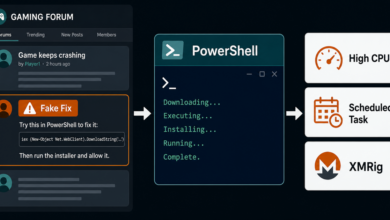
Related update: ClickFix lures have also moved into Steam forum replies that install XMRig miners; see the Steam forum ClickFix warning.