Malwarebytes has reported a fake software campaign that used GitHub and SourceForge pages to impersonate popular tools and plugins, including ChatGPT, Claude, AutoTune, Kontakt, Ableton Live, and ZENOLOGY. The pages did not just host random downloads: they asked visitors to run installer commands that led to a Deno-based backdoor known as DinDoor.
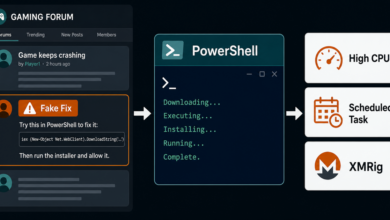
The important warning sign is the combination of a trusted-looking download page and a command you are told to paste into Terminal, Command Prompt, or PowerShell. Official installers should not require a random repository README to talk you into running a copy-pasted command.
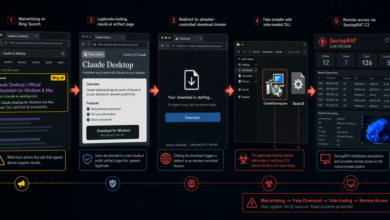
Related fake-installer case: A newer FakeAgent campaign used a public Claude Artifact, ClaudeDesktop.exe, and DLL sideloading to install SectopRAT. See the Fake Claude Desktop malvertising report.
What Happened
In its May 26, 2026 report, Malwarebytes said attackers used compromised YouTube channels to push links to malicious GitHub and SourceForge projects. The videos promoting the fake tools had more than 50,000 views at the time of the research.
The lures targeted people looking for AI tools, audio plugins, gaming software, and unofficial installers. Malwarebytes said GitHub removed the reported repositories, but the operators were already rotating accounts and are likely to recreate similar projects.
A Help Net Security summary noted the same user-facing pattern: the malicious repositories tell visitors to paste commands that download an MSI installer or PowerShell script, then use legitimate tools such as Scoop, WinGet, and Deno during the infection chain.
Why It Matters
This is more dangerous than a normal unwanted bundle. Malwarebytes says the chain installs the Deno JavaScript runtime and uses it to run DinDoor, which can fetch more payloads. The later RAT can execute commands, manage files, take screenshots, open proxy tunnels, and steal data from browsers, wallets, Telegram, Discord, and other applications.
One unusual detail is that the RAT can launch Microsoft Edge and use browser features to relay screen video through WebRTC. That makes the traffic look less like a traditional remote-control tool and more like activity from a legitimate browser process.
Quick Check Before Downloading
- Download ChatGPT, Claude, audio plugins, game utilities, and productivity tools from the official vendor site or a vendor-linked store.
- Be suspicious when a GitHub, SourceForge, forum, or video description tells you to paste
curl,msiexec,PowerShell,winget, ordeno run -Acommands. - Check the uploader’s profile age, project history, release history, issue activity, and whether the page is pretending to be an official installer.
- Avoid cracked, “free premium,” unofficial plugin, or AI-tool installer pages promoted by comments, short videos, or hijacked channels.
- On Windows, check the file’s publisher and digital signature before running it. A missing or strange signature is a warning sign, even if the file is hosted on a well-known site.
If You Ran One of These Installers
- Disconnect the device from the network if you suspect the installer executed.
- Use a clean device to change passwords for email, browser sync, financial accounts, developer accounts, and wallets.
- Revoke active sessions and tokens for accounts that were signed in on the affected browser.
- Check installed apps, startup entries, browser extensions, and recently created scheduled tasks for unfamiliar items.
- Run a reputable malware scan and consider professional help if wallets, business accounts, or saved browser passwords were exposed.
Related Cleanup Guides
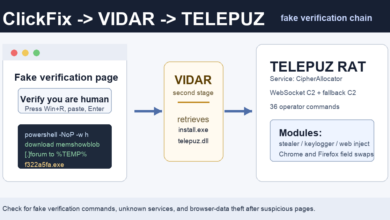
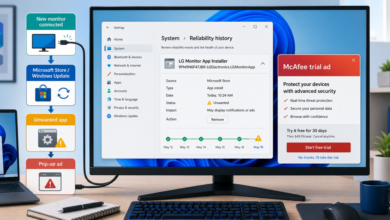
If the suspicious download also brought redirects, pop-ups, or browser changes, review the PUP removal basics and the adware warning signs. For scams that ask you to run commands from a fake verification page, the recent fake Cloudflare CAPTCHA ClickFix report covers the same copy-and-run social engineering pattern.
Related warning: Attackers are also abusing trusted AI sharing pages, not only code repositories. A newer LLMShare campaign uses real ChatGPT share links to display fake outage pages that push malware downloads. Read the update on ChatGPT share links abused for fake outage malware downloads.
Related: Fake software pages keep evolving. Check Point later documented how polished fake download portals can preserve real-looking links while routing clicks elsewhere.
Related warning: Fake AI installers and fake free-software tutorials share the same risk: a trusted-looking platform can send users toward a command or installer they should not run. Read the update on short videos pushing Vidar through PowerShell commands.
Related fake-installer warning: Attackers are still abusing trusted-looking software searches. Elastic reported a fake Node.js ad chain that used a batch file, PowerShell, and OXLOADER to deliver CastleStealer. See the newer report on fake Node.js ads and OXLOADER.