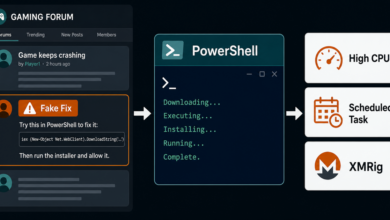
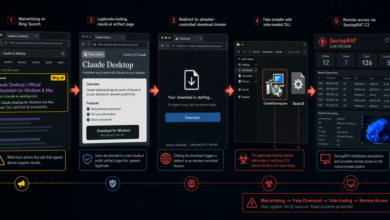
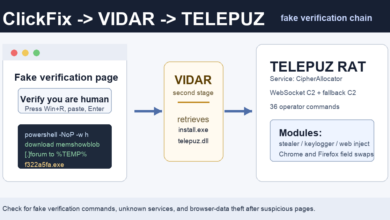
Fake human-verification pages are again being used as a malware delivery shortcut, but the newest campaign has a few concrete warning signs that make it easier to spot. Malwarebytes reported on July 2, 2026 that fake Google and Cloudflare verification pages are telling visitors to copy and run PowerShell commands, then using shared infrastructure to deliver loaders, stealers, and remote access tools.
The chain is part of the broader ClickFix pattern: a page pretends that a CAPTCHA, video, file viewer, or browser check cannot continue until the visitor follows a “fix” instruction. Instead of proving anything, the instruction moves the dangerous step onto the user’s own keyboard.
What changed in this campaign
The most useful detail is not the brand impersonation by itself. It is the repeatable infection pattern. Malwarebytes says the campaigns commonly use PowerShell commands, Cloudflare R2 buckets, and a staging folder named C:ProgramDataZooms. Some pages also return the short response hehe, and several chains rely on domains or IP addresses that have recently been repurposed.
The payload list is broad. Malwarebytes observed delivery of HijackLoader, StealC, Remus, Amatera Stealer, CastleLoader, NetSupport, and a Rust-based stealer. One analyzed chain used a trojanized Franz messaging-app installer to drop a previously undocumented loader named ResiLoader, which then disabled security tools before deploying StealC.
That combination makes the campaign relevant even when a page looks like a normal “I am human” check. A real browser, search engine, CDN, or video site should not ask you to open PowerShell, Terminal, Command Prompt, or the Windows Run box to finish verification.
Quick check after seeing this lure
- Do not paste any command copied from a web page into PowerShell, Terminal, Command Prompt, or the Windows Run dialog.
- If you already ran the command, disconnect the device from the network and scan it before signing back into accounts.
- Check for unexpected files or folders under
C:ProgramDataZooms, but do not run anything found there. - Review browser extensions, recently installed apps, startup items, and saved-session warnings in important accounts.
- Change passwords from a clean device if the machine may have run an infostealer.
Why browser clipboard defenses matter
The same day, Opera announced Paste Protect, a desktop-browser feature that blocks suspicious commands before they reach the clipboard and warns the user about ClickFix-style content. That kind of protection is useful, but it should not be treated as permission to follow unknown technical instructions. Other browsers and extensions may behave differently, and attackers regularly adjust the text they ask people to copy.
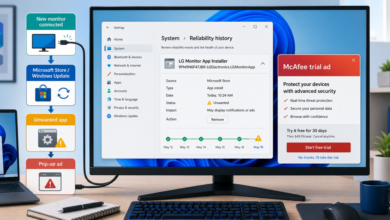
For everyday cleanup, this campaign overlaps with older fake-browser-update and fake-CAPTCHA traffic. If the page also triggers redirects, notification prompts, or pop-up loops, use the browser notification scam removal guide and the broader pop-up ads and browser notifications guide to remove unwanted site permissions. For similar command-paste lures, compare the DriveSurge ClickFix campaign and the fake Cloudflare CAPTCHA case.
Takeaway
A verification page that asks for a pasted command is not a verification page. Close it, clear the tab’s site permissions if it pushed notifications, and treat any executed command as a possible malware incident. The strongest sign in this report is simple enough to remember: browser verification happens in the browser, not in PowerShell.
Sources: Malwarebytes threat-intel report; Opera Paste Protect announcement.
Related Mac angle: attackers have also used sponsored social ads, not only fake verification pages, to push copy-paste install steps. See the newer report on a fake DynamicLake X ad that led to a Mac stealer.
Related ClickFix update: Unit 42 has reported a separate JokerStat campaign where compromised WordPress pages use a fake CAPTCHA, Polygon-based C2 lookup, and a Ruby infostealer chain. Read the update on JokerStat fake CAPTCHA pages.
Related clipboard-risk update: Elastic has also documented SCMBANKER, a fake CAPTCHA/ClickFix toolkit that can replace copied bank account numbers during transfer attempts. See the newer SCMBANKER bank-transfer hijack report.
Related Mac update: A newer ClickFix-style threat called ClickLock targets macOS users with a fake verification flow, LaunchAgents, and password coercion. See the ClickLock Mac stealer report.