Push Security reported on May 29, 2026 that attackers are using shared AI chatbot pages as a new malware-delivery step. In the ChatGPT version, a sponsored search result can lead to a real chatgpt.com/s/ share URL that renders a fake service-outage page and tells the visitor to download a desktop app.
The important warning is not just “watch for misspelled domains.” In this campaign, the first page can appear on a trusted domain. The risky part is the action the page asks you to take: leave the normal web app flow and install a desktop download from a separate site.
What Happened
Push tracks the technique as LLMShare. The company said attackers are abusing shared-content features in ChatGPT and Claude, then driving users to those pages through sponsored search ads and SEO-style discovery. The report says the new ChatGPT variant uses code rendering to build a full fake outage notice, not just a normal shared conversation.
The fake notice says the service is experiencing high traffic and that the user should download a desktop app to continue. Push said the download button redirects to openew[.]app, a site that closely imitates ChatGPT’s desktop download page. Malwarebytes separately documented the same openew[.]app fake ChatGPT download site on May 28, reporting separate Windows and macOS payloads aimed at credentials, browser data, Telegram sessions, and cryptocurrency wallets.
Push listed observed indicators including a defanged ChatGPT share URL, a Claude share URL, openew[.]app, and a SHA-256 hash for one downloaded executable. The researchers also warned that these indicators can rotate quickly, so the safer lesson is behavioral: a shared AI page should not become a reason to install software from an unfamiliar site.
Why the Trusted URL Is the Trick
Many people check the address bar before clicking. That is still useful, but LLMShare abuses a gap in that habit. The first-stage page can be hosted on a legitimate AI platform, so a user may see chatgpt.com or claude.ai and assume the whole flow is safe.
This is similar to other recent trusted-platform lures. Fake AI installers have already appeared on GitHub and SourceForge, and fake CAPTCHA or ClickFix prompts have appeared on otherwise legitimate websites after those sites were compromised. If you are comparing symptoms, see the recent note on fake ChatGPT and Claude installers distributed through GitHub and SourceForge and the warning about fake Cloudflare CAPTCHA prompts on hijacked Ghost sites.
Warning Signs to Check
Be suspicious when a shared ChatGPT or Claude page shows a polished outage screen, support notice, or install guide instead of the content you expected to see. A real service outage does not require you to download an installer from an unrelated domain.
Other red flags include a sponsored search result for a tool you already know, a page that claims the web version is unavailable but pushes a desktop app, a download domain that is not the vendor’s official site, or an instruction to paste commands into Terminal, PowerShell, Windows Run, or Command Prompt. For browser-cleanup symptoms such as repeated pop-ups, fake alerts, or unwanted redirects, the pop-up ads and browser notifications guide is a better starting point than downloading any “fix” from a search ad.
What to Do If You Clicked
If you only viewed the fake outage page, close the tab and open the service again by typing the official address yourself. For ChatGPT desktop downloads, use OpenAI’s official download page or a trusted app store path, not a link reached through an unexpected shared page or advertisement.
If you downloaded the file but did not open it, delete it and empty the browser’s downloads list only after noting the filename and source. If you ran the installer, assume browser data and account sessions may be at risk. Disconnect from sensitive accounts, run a reputable malware scan, check startup items and recently installed applications, and change passwords from a clean device. Pay special attention to browser-stored passwords, cookies, cryptocurrency wallets, Telegram sessions, and any account you used on the same machine.
If you installed an app that behaves like a normal program but changes browser settings, injects ads, or keeps returning after removal, treat it as a potentially unwanted program. The What Is a PUP? guide explains why unwanted software can look user-installed while still being deceptive.
Quick Check
A safe shared AI page should not ask you to install a desktop app from a different domain, paste a command, or trust a sponsored search ad over the vendor’s official download page. If the page says “high traffic” and turns that into a download prompt, close it and navigate to the official site yourself.
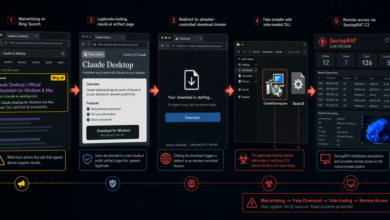
Related AI-download warning: Attackers are still abusing trusted AI-platform surfaces as malware bridges. A newer FakeAgent campaign used a public Claude Artifact and sponsored Bing ads to push ClaudeDesktop.exe with SectopRAT. Read the Fake Claude Desktop ads report.
References