Check Point Research has reported a large fake-download ecosystem that impersonates open-source and freeware projects, then turns a normal-looking download click into a hidden redirect through a traffic distribution system. The important warning is simple: a download page can keep a real-looking link on the screen while JavaScript sends the first click somewhere else.
The campaign is especially relevant because it targets the moment when people are trying to install useful tools. A polished page, a high search ranking, and a Download button are not enough to prove that the file is safe.
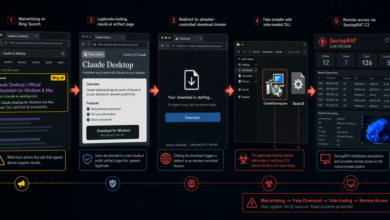
Related fake-download update: Sponsored search and trusted-platform redirects remain a malware delivery path. The newer FakeAgent case used a Claude Artifact and fake ClaudeDesktop.exe installer; read the SectopRAT Claude Desktop warning.
What Check Point Found
In a June 3 report, Check Point said it investigated fake project portals that impersonated open-source and freeware tools, including lookalikes for security and utility projects such as ghidralite[.]com, grpcurl[.]com, winsetupfromusb[.]org, and crystaldiskmark[.]org.
The pages did not always look crude. Some appeared professional and could reference real upstream resources, such as a legitimate GitHub release. That is what makes the click-hijacking trick dangerous: the visible link can look plausible, but a CloudFront-hosted script can intercept the first eligible click and route the browser through a separate TDS chain.
Check Point said it identified more than 100 active websites embedding the same style of TDS scripts. The routing layer used gating rules such as first-visit checks, browser and device logic, VPN or datacenter filtering, anti-analysis behavior, frequency caps, and geography-based branching. In plain language, two people clicking the same fake Download button may not see the same result.
Where The Redirects Can Lead
Some redirect paths led to offer walls, browser-extension offers, or potentially unwanted applications. Other branches led to malware delivery infrastructure.
Check Point observed several payload families or delivery branches, including SessionGate, RemusStealer, and AnimateClipper. SessionGate was described as a gated installer/bundler framework that can silently download and execute additional software based on server-side configuration. RemusStealer targets browser data, password managers, crypto wallets, 2FA extensions, cookies, history, screenshots, and files selected by the operator. AnimateClipper is a crypto clipper that can replace copied wallet addresses before a victim pastes them.
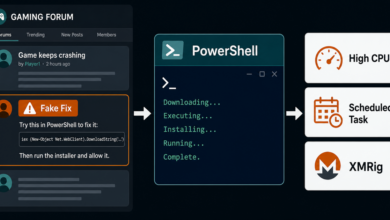
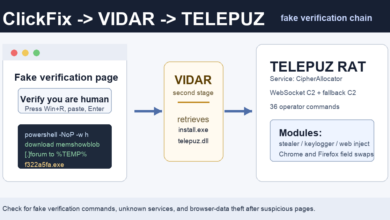
The same ecosystem also included a ClickFix-style branch that imitated a Cloudflare verification page and told the visitor to run a Windows command. That overlaps with other recent browser-abuse campaigns, including fake browser update and ClickFix lures seen in the DriveSurge campaign.
Quick Check Before You Install
Before downloading a tool from a search result, verify the official site from more than one place. For open-source software, check the project owner, repository history, release signatures or hashes when available, and whether the domain is linked from the real repository or documentation.
Be careful with download portals that appear above or beside the official project, especially if the page opens a new tab, an offer wall, a survey, a password-protected archive, or a separate installer domain after the first click. A real installer should not ask you to run a command copied from a web page, disable security settings, or install an unrelated browser extension.
If a page asks for a command-paste action, treat it like a malware warning. The same rule applies to fake AI, plugin, and utility installers; a recent campaign used trusted-looking GitHub and SourceForge pages to push fake ChatGPT and Claude installers.
If You Already Clicked
If you clicked but did not run the file, close the tab and delete the download. Do not try to “finish” the installer to see what happens.
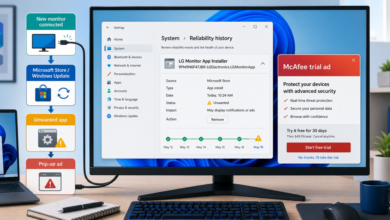
If you ran an installer from a suspicious page, remove unknown apps, check browser extensions, reset unwanted browser changes, and scan the system. Review saved passwords and crypto-wallet activity from a clean device if the download may have executed a stealer. For unwanted software behavior, the PUP removal basics and adware warning signs are useful starting points.
Takeaway
The risky part of this campaign is not just a fake domain. It is the post-click routing. A fake download page can preserve enough normal-looking details to pass a quick glance, then use JavaScript and a TDS to decide what the visitor actually receives. Treat unexpected redirects, new tabs, command prompts, password-protected archives, and bundled offers as signs to stop before running anything.
Related: Mac users should watch the same sponsored-download pattern. The newer FlutterBridge macOS malvertising campaign used fake utility apps to deliver adware with backdoor features.
Related warning: Fake download pages are not the only way users are being pushed toward risky installers. Short social videos are also promoting fake free software tricks that lead to PowerShell commands and Vidar stealer. See the update on fake free software videos pushing Vidar.
Related malvertising update: Fake download pages are not the only route into deceptive installers. A June 2026 OXLOADER report shows how a sponsored Node.js result led to a fake setup flow and CastleStealer. Read the update on fake Node.js ads delivering OXLOADER.
Related proxyware update: Infoblox later connected fake 7-Zip and WireVPN-style installers to Lurking Lizard proxyware that can turn a device into a residential proxy node. See the fake 7-Zip proxyware report for the user checks.