International law enforcement and private-sector partners announced on June 18, 2026 that they disrupted part of the SocGholish malware network, also known as FakeUpdates. The operation matters for everyday web users because SocGholish has long relied on hacked legitimate websites to show fake browser and software update prompts.
According to the Operation Endgame announcement, 106 servers and domains were taken down and 14,971 infected websites were remediated. Many of the compromised sites were ordinary WordPress sites for everyday services, such as restaurants or auto garages, which means a visitor could have reached the lure from a site that otherwise looked familiar.
What Happened
The action was part of Operation Endgame and involved authorities from the Netherlands, Canada, the United States, and Germany, with support from Europol and Eurojust. The announcement says the operation cleaned infected WordPress sites, notified affected site owners, took over domains, and removed servers used by the SocGholish botnet.
Shadowserver also published a June 18 special report for compromised WordPress site owners. It said law enforcement partners and private-sector responders used the operation to notify site owners and reduce the number of legitimate domains that could be reused for SocGholish delivery.
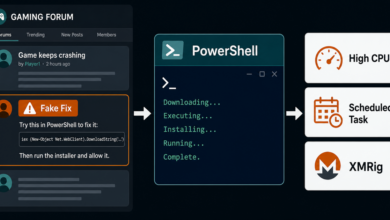
The key user-safety point is simple: a fake update prompt can appear on a real website if that site has been compromised. The trustworthy-looking domain is part of the trick. For a similar recent distribution pattern, see the warning about DriveSurge fake browser update and ClickFix lures.
How SocGholish Tricks Visitors
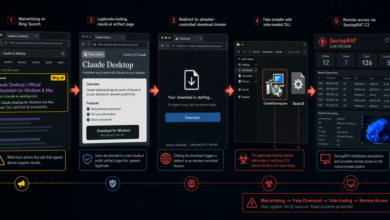
SocGholish is commonly described as FakeUpdates because its lure imitates software updates. A visitor lands on a compromised site, injected code or redirect logic sends the browser toward attacker-controlled infrastructure, and the user sees a prompt claiming that Chrome, Firefox, or another common program needs an urgent update.
If the visitor downloads and runs the fake update, the malware can create an initial foothold on the device. From there, attackers may sell or use access for additional malware, credential theft, or ransomware deployment. The visitor may not connect the infection to the original website because the page looked like a normal local business, news, or service site.
This is different from a normal browser update. Real browser updates come from the browser’s own update mechanism, the operating system’s software update flow, or the official app store. A random page that interrupts browsing and asks for a manual browser update download should be treated as unsafe.
What Website Owners Should Check
Operation Endgame and Shadowserver both emphasized WordPress hygiene after the cleanup. Site owners should change WordPress login credentials, enable multi-factor authentication, remove unknown administrator accounts, and patch WordPress core, themes, and plugins. Those steps are especially important if credentials were reused, leaked, or shared with old contractors.
Owners should also look for unfamiliar plugin files, unexpected JavaScript in templates, recently created users, new scheduled tasks, and redirects that only appear for first-time visitors, mobile users, search traffic, or specific countries. SocGholish-style campaigns often hide from the site owner while showing lures to selected visitors.
What Visitors Should Check
If you saw a browser update prompt on a website and did not download anything, close the tab and open the browser’s own update page from its menu or official website. Do not return through the pop-up or the same redirect chain.
If you downloaded a file but did not run it, delete the file and clear the download prompt. If you ran the installer, treat the device as potentially compromised: disconnect from sensitive accounts, run a reputable malware scan, check startup items and recently installed programs, and change important passwords from a clean device.
If the visible symptom after the event is repeated pop-ups, ad redirects, or notification spam, also review browser extensions and site permissions. The pop-up ads and browser notifications guide covers those checks, and the What Is Adware? guide explains why unwanted browser behavior can continue after a deceptive install.
Quick Check
A real browser update does not arrive as a dramatic pop-up from a random website. If a page says your browser needs an urgent manual update, close the page and update from the browser menu, the operating system settings, or the vendor’s official site. If you manage a WordPress site, assume old credentials and unknown admin accounts are as important to check as the visible malware files.
References