Elastic Security Labs reported on July 16, 2026 that a Windows malware family called TELEPUZ is spreading through a ClickFix chain that first uses VIDAR as a downloader. The user-facing lure is familiar: a fake verification page tells the visitor to copy and run a command so the page will supposedly unlock.
This is not a browser exploit. It is social engineering that makes the victim run the installer. That makes it relevant for anyone who lands on fake CAPTCHA, fake update, or fake browser-check pages after a redirect, search result, ad, or compromised site.
What Elastic Found
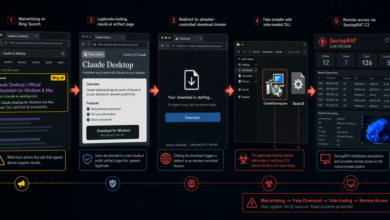
Elastic says TELEPUZ has been active since late April 2026 and is still in active development. The initial command observed by researchers downloads a second stage from memshowblob[.]forum into the user’s %TEMP% folder. That second stage is a Go variant of VIDAR, which then retrieves install.exe and telepuz.dll from hurgadatour[.]shop.
The repeated path marker telemetriawork was highlighted as a useful family clue. Elastic also listed staging domains such as momasites[.]lol, hardenedom[.]shop, and netblokirovka[.]asia, plus core C2 domains including cal.joycedoula[.]com[.]br and cal.snehamumbai[.]org.
Adware Guru has covered related abuse before, including DriveSurge fake browser-update ClickFix lures and fake free-software videos that pushed VIDAR through PowerShell commands. TELEPUZ is a separate case because the ClickFix-to-VIDAR chain now installs a modular remote-access payload.
Why TELEPUZ Is Different
TELEPUZ is designed as a lightweight remote-access malware rather than a one-step download. Elastic described 36 operator commands, WebSocket-based command-and-control, fallback C2 retrieval through public services, and optional modules for stealing data, keylogging, browser interaction, and web injection.
One important browser detail is the web-inject module. Elastic says the module can interact with Chromium-based browsers through the Chrome DevTools Protocol and with Firefox through WebDriver BiDi. Its default behavior appears centered on intercepting pages and swapping financial form fields such as IBAN values.
That makes the story close to other browser-abuse and transaction-hijack cases, including SCMBANKER fake CAPTCHA pages that hijacked bank transfers. The visible symptom for a normal user may still be just a fake verification prompt, but the installed payload can become much broader than a pop-up problem.
Signs to Check on Windows
If a website told you to press Win+R, paste a command, or run PowerShell to pass a verification check, treat that as a compromise warning. Real CAPTCHA and Cloudflare checks do not require you to paste commands into Windows.
After a suspicious prompt, check for files launched from %TEMP%, unexpected rundll32.exe activity, and unknown services. Elastic observed TELEPUZ using the service name CipherAllocator in one configuration, but service names can change, so do not rely on that name alone.
Also review recent browser behavior. Watch for changed sessions, unexplained logouts, payment forms that behave oddly, unexpected downloads, or security tools warning about browser-cookie theft. If the problem is instead recurring desktop pop-ups from websites, clean notification permissions with the browser notification scam removal guide; ClickFix command prompts and notification spam are different problems even when they use similar fake verification wording.
Quick Takeaway
Do not run commands from a web page to prove you are human. If you already did, disconnect from sensitive accounts, change important passwords from a clean device, check browser extensions and saved sessions, and run a full security scan. TELEPUZ shows why fake verification pages should be treated as malware delivery, not as a broken website.
Reference
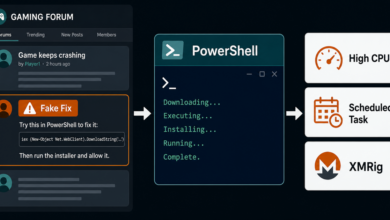
Related cleanup note: Steam forum replies are now using the same command-copy social engineering style to install miners; see the newer Steam ClickFix XMRig warning.