ReversingLabs reported on June 9, 2026 that attackers are using short tutorial videos on TikTok and Instagram Reels to push fake “free premium” software tricks. The videos look like quick Windows tips or free activation guides, but the real goal is to make viewers run a command or visit a download site controlled by the attackers.
The lure is familiar: free Spotify Premium, free Windows activation, free Microsoft Office, or other paid software without a license. The risky part is not the brand name in the video. It is the instruction to copy a command into PowerShell or follow a download page that was not reached from the vendor’s official site.
What Happened
ReversingLabs said it observed two related social-media campaign styles. One used many near-identical accounts with names such as windows.tips or windows.insight, blue-and-white profile art, and tutorial-style videos. Another built engagement around free premium software demos before sending users to a central tutorial or download page.
In one example, a short video walked viewers through opening PowerShell and running a command tied to msget[.]run/spotify. ReversingLabs said the executable recovered from that flow was analyzed as Vidar stealer. The company also listed indicators such as Pluginchad[.]xyz, Maxapk[.]xyz, D4ug[.]site, Slmgr[.]sh, and the SHA-256 hash 03bbc4fa1fd784276da135ab62fef85aaddea66e6eb176d7e59c3398f818b153.
Malwarebytes summarized the same finding on June 10 and noted that the lures promise free Spotify Premium, free Windows activation, or free Microsoft Office before leaving users with infostealers on Windows devices. That consumer-facing angle is why the campaign matters even if a particular video disappears quickly.
Why Short Videos Make the Lure Work
A polished short video can feel safer than a random pop-up because it appears in a normal feed, has likes or saves, and may look like a common tutorial. ReversingLabs reported one observed video with more than 100,000 views and thousands of interactions. That does not make the advice safe; it can simply mean the algorithm has pushed the scam to more people.
The flow also borrows from recent ClickFix-style abuse. Instead of dropping a suspicious attachment, the scam tells the user to perform the dangerous step manually: open PowerShell, paste a command, or run a file. If a web page or video asks you to paste code into PowerShell, Windows Run, Terminal, Command Prompt, or a browser console, treat that instruction as the warning sign.
Similar command-paste tricks have shown up in fake CAPTCHA and fake update campaigns. For comparison, see the earlier warning about fake Cloudflare CAPTCHA prompts that told visitors to run Windows commands and the recent fake download-site TDS campaign.
What Vidar Can Put at Risk
Vidar is an infostealer family. Once it runs, the immediate risk is not a visible pop-up; it is quiet data theft. Malwarebytes noted that Vidar commonly targets saved browser passwords, autofill data, browser cookies, cryptocurrency wallets, two-factor authentication data, and Tor browser data.
That means the cleanup cannot stop at deleting the downloaded file. If the stealer ran, browser sessions and account tokens may already be exposed. A password change from the same infected Windows profile may not be enough if the malware is still present or if session cookies have already been stolen.
Warning Signs to Check
Be skeptical of any short video, reel, or “life hack” that promises a paid app or subscription for free. Extra warning signs include a command copied from a caption, a download from a newly seen domain, a tutorial that disables security prompts, or a file name that does not match an official installer.
For normal software, start from the vendor’s official website, a trusted app store, or a known enterprise software portal. If the offer is a crack, keygen, activation bypass, premium unlocker, or “one-line command” fix, assume it can install malware or a potentially unwanted program. The What Is a PUP? guide explains why unwanted software often arrives through user-initiated installs that were marketed deceptively.
What to Do If You Ran the Command
If you only watched the video, close it and avoid saving or sharing it. If you copied the command but did not run it, clear the clipboard by copying harmless text, close the browser tab, and do not revisit the download domain.
If you ran the command or opened the downloaded file, treat the device as potentially compromised. Disconnect from sensitive accounts, run a reputable malware scan, check recently downloaded files and startup entries, and change passwords from a clean device. Revoke active sessions where possible, especially for email, social media, cloud storage, cryptocurrency services, and accounts used from that Windows profile.
If the main symptom afterward is browser redirects, unwanted ads, or notification spam, also review browser extensions and site permissions. The pop-up ads and browser notifications guide covers the browser-side checks that are worth doing after a suspicious install.
Quick Check
A real software vendor does not need a TikTok or Instagram tutorial that asks you to paste a hidden command into PowerShell. If the promise is “free premium” and the action is “run this command,” stop there. Open the official site yourself, and do not use the video’s domain or command as a shortcut.
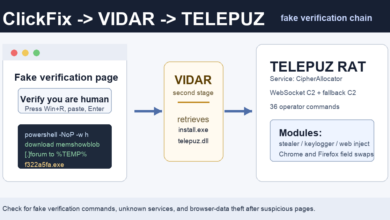
Related ClickFix update: Elastic has now described a separate TELEPUZ campaign where a fake verification command uses VIDAR as a downloader before installing a modular RAT. Read the TELEPUZ ClickFix report.
References
- ReversingLabs: Phishing attacks leverage TikTok, Instagram Reels
- Malwarebytes: Free Spotify Premium hacks on social media are spreading infostealers
Related proxyware update: Infoblox later connected fake 7-Zip and WireVPN-style installers to Lurking Lizard proxyware that can turn a device into a residential proxy node. See the fake 7-Zip proxyware report for the user checks.
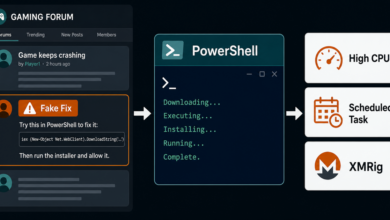
Related update: the same PowerShell-copy risk now appears in gaming support threads; see the Steam forum ClickFix XMRig miner report.