Attackers are replying to real troubleshooting threads on Steam discussion forums with fake fixes that tell players to run PowerShell as administrator. The command looks like a Windows optimization or repair script, but it installs an XMRig cryptocurrency miner instead.
The campaign was reported by BleepingComputer on July 25, 2026. It is a good example of why ClickFix-style instructions are dangerous even when they appear inside a familiar community thread rather than on a fake CAPTCHA page.
What The Fake Steam Fix Does
The replies target people asking for help with game crashes, missing inventory items, or other PC problems. The attacker presents a command as a quick repair step and asks the user to open PowerShell with administrator rights.
Once executed, the script pretends to clean temporary files, flush DNS, update drivers, scan for malware, repair Windows images, and run system checks. Those progress messages are camouflage. The real malicious function checks for administrator privileges, weakens protection around its install path, downloads a miner, and sets persistence so the miner starts again after reboot.
Indicators To Check
If you ran a PowerShell command copied from a Steam forum reply, check Windows for these signs:
C:\Windows\Backgroundexists and containssystem.exeor miner-related files.- Microsoft Defender has an exclusion for
C:\Windows\Background. - Task Scheduler contains a task that starts with
XMRig-. - CPU usage stays high when no game or heavy app is running.
- Recent PowerShell history contains a web download command copied from a forum post.
Quick Cleanup Steps
Disconnect the PC from the network if CPU usage is unusually high or you find the artifacts above. Run a full scan with a reputable security tool, then inspect Task Scheduler and Defender exclusions manually. Remove the XMRig- scheduled task, delete the Defender exclusion, and remove the suspicious folder only after the miner process has been stopped.
If the downloaded file ran with administrator privileges, treat the system as potentially modified beyond the visible miner. Change passwords from a clean device, especially for Steam, email, banking, and cryptocurrency accounts. A Windows reinstall may be the safer option if you cannot confirm exactly what the script changed.
Why This Fits The ClickFix Pattern
ClickFix attacks work because they make the victim perform the risky action. Recent campaigns have used fake verification prompts, fake browser updates, and fake software help pages. This Steam forum version uses the same idea but wraps it in a support reply that appears to answer the user’s immediate problem.
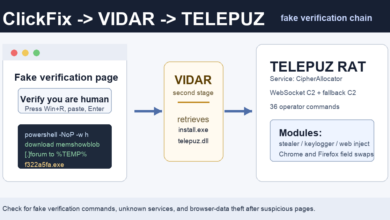
Adware Guru has recently covered related command-copy lures, including ClickFix pages pushing TELEPUZ through VIDAR, fake Google and Cloudflare checks pushing ResiLoader and stealers, and fake free-software videos that pushed VIDAR through PowerShell commands.
Takeaway
Do not run PowerShell, Command Prompt, Terminal, or Registry commands from forum replies, social posts, video comments, or pop-up instructions. If a fix is legitimate, the game publisher, Microsoft, or the software vendor should document it on an official support page. When a stranger asks you to run a command as administrator, assume the command is the payload.
For browser-based social engineering that starts with notification prompts, see the Browser Notification Scam Removal Guide.