Syndication.realsrv.com Redirects – What It Is and How to Stop It

Quick answer
What to do about Syndication.realsrv.com
Short answer: Syndication.realsrv.com is usually a browser pop-up, redirect, or notification-permission problem rather than a normal system message.
Start here: close the tab, do not press Allow, remove the site from browser notifications, and check recent extensions if it returns.
Need browser steps? Use our browser notification scam removal guide for Chrome, Edge, Firefox, Safari, and Android.
Updated May 2026: Syndication.realsrv is usually seen as a redirect or advertising endpoint rather than a program you intentionally installed.
What it usually means: Searches for realsrv suggest users are seeing an unfamiliar domain in the address bar, a new tab, or an ad redirect chain.
First cleanup step: Check browser extensions, notification permissions, and recently installed apps before changing deeper Windows settings.
Related guide: For Chrome, Edge, Firefox, Safari, and Android notification settings, use the browser notification scam removal guide.
Syndication.realsrv.com is a site that tries to force you into subscribing to its browser notifications so that it can send notification window to your computer .
What is Syndication.realsrv.com?
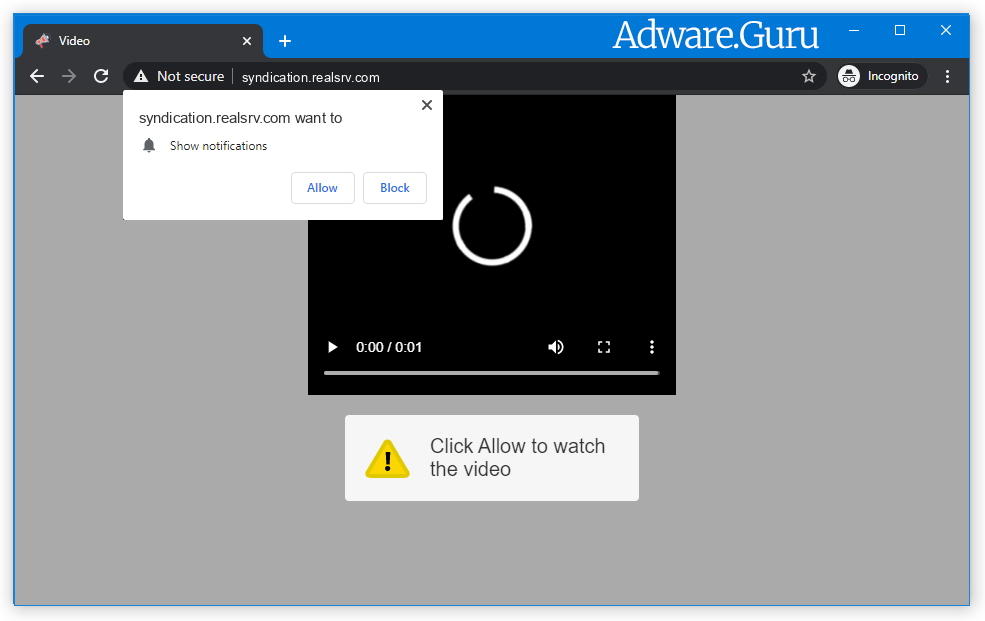
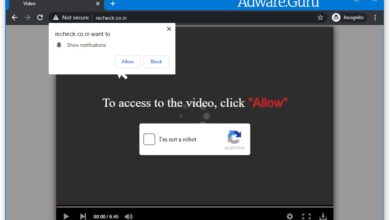
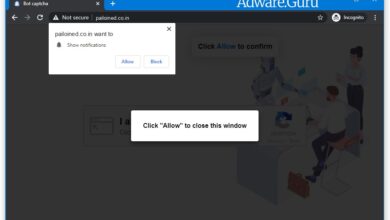
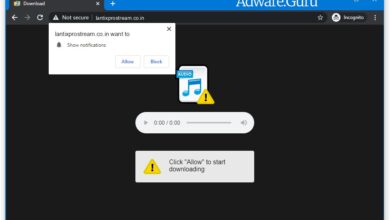
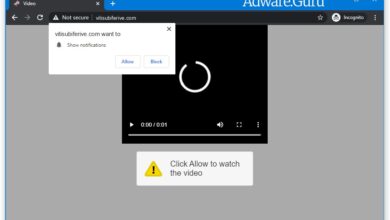
Syndication.realsrv.com is a site that displays fake error messages to trick you into subscribing to its browser notifications. These are a few of the fake error alerts that the Syndication.realsrv.com will pop-up to trick you into clicking the “Allow” button:
To access to the video, click "Allow"
Click "Allow", to watch the video
Click "Allow", to close window
Click "ALLOW" to play the video
Stream and download available
Can't play this video! Browser may block video
autoplay... Click "Allow" to play the video
Type Allow to verify that you are not a robot
Click Allow to watch the video
You should not click on the “Allow” button when you see such messages. If you click on the “Allow” button, you will start seeing spam pop-ups from Syndication.realsrv.com on your computer or phone, even when the browser is closed. The Syndication.realsrv.com spam notification ads are for 18+ sites, fake software updates, unwanted programs and etc.
Why am I getting the Syndication.realsrv.com notification ads?
You are seeing the Syndication.realsrv.com advertisements because your PC is infected with a adware or a site that you have visited has redirected your browser to this domain.
Questionable sites can display malicious banners that redirect your browser to Syndication.realsrv.com to generate advertising revenue. If this happens, you can close the page and install a free browser extension like Adblock to block the ads. However, if you continuously see pop-ups from Syndication.realsrv.com, then your computer might be infected with a malicious program, and we will need to scan your computer for viruses and eliminate it.
Here are a few typical signs that you have a infected computer:
- Advertisements appear in places they shouldn’t be;
- Your web homepage has mysteriously changed without your permission;
- Website links redirect to questionable sites;
- Web pages that you typically visit are not displaying properly;
- Browser pop-ups appear which recommend fake updates or other software;
- Other unwanted programs might get installed without your knowledge;
To check your computer for the Syndication.realsrv.com adware and remove it, please use the guide below.
How to Remove Syndication.realsrv.com:
- Remove Syndication.realsrv.com Automatically
- Remove Syndication.realsrv.com From Programs and Features
- Delete Rogue Programs From File Explorer
- Remove Syndication.realsrv.com Adware From Browsers
- Delete Syndication.realsrv.com Notifications
- Get rid of Syndication.realsrv.com pop-ups and notifications on Android
- How to Protect Your PC From Syndication.realsrv.com and Other Adware
Remove Syndication.realsrv.com Automatically:
The easiest method to stop Syndication.realsrv.com ads is to run an anti-malware program capable of detecting adware in general and Syndication.realsrv.com in particular. You may try GridinSoft Anti-Malware. It’s good at detecting and removing adware and other PUPs (potentially unwanted programs).

Other software that may be able to get rid of Syndication.realsrv.com:
Note: After removing the adware you might still need to disable Syndication.realsrv.com notifications manually (see the step named Delete Syndication.realsrv.com Notifications).
You can also try to remove Syndication.realsrv.com by hand using the following instructions.
Remove Syndication.realsrv.com From Programs and Features:
Go to Programs and Features, uninstall suspicious programs, programs you don’t remember installing, or programs you installed just before Syndication.realsrv.com appeared on your browser for the first time. When you are not sure if a program is safe, look for the answer on the Internet.
Windows 11:
- Right-click the Start button and select Installed apps.
- Sort apps by install date and look for programs you do not recognize.
- Click the three dots button next to the suspicious program and select Uninstall.
- Restart the PC and check the browser again.
Windows 10:
- Right-click the Start button and select Apps and Features.
- Sort apps by install date and inspect programs installed before the pop-ups started.
- Select the suspicious program and click Uninstall.
- Restart Windows after removal.
Delete Adware App From File Explorer:
This step is for experienced computer users. You might accidentally delete something you weren’t supposed to. Sometimes malicious programs don’t show up in Programs and Features. Check also %ProgramFiles%, %ProgramFiles(x86)%, and especially %AppData% and %LocalAppData% (these are shortcuts; type or copy and paste them into the address bar of File Explorer). If you see folders with unfamiliar names, see what’s inside, google those names to find out if they belong to legitimate programs. Delete the ones that are obviously associated with malware. If you are not sure, back them up before deleting them (copy to a different location, for example to a thumb drive). Or you can easy to use GridinSoft Anti-Malware for search and remove such files:
Remove Syndication.realsrv.com From Browsers:
Remove suspicious browser extensions you do not recognize. You can also reset browser settings with GridinSoft Anti-Malware:
Remove Syndication.realsrv.com from Google Chrome:
- Click on three dots menu button
 at the top right corner of the window.
 - Select More tools ⇒ Extensions.
- Click REMOVE to uninstall an extension.
- Click Remove in the dialog box.
Remove Syndication.realsrv.com from Mozilla Firefox:
- Click on menu button
 and select Add-ons.
 - Go to Extensions tab.
- To uninstall an add-on, click on Remove button next to it.
Remove Syndication.realsrv.com from Microsoft Edge:
- Open edge://extensions/ in the address bar.
- Turn off or remove extensions you do not recognize.
- Open edge://settings/content/notifications.
- Remove Syndication.realsrv.com and other suspicious sites from the Allow list.
- If redirects continue, open edge://settings/reset and use Restore settings to their default values.
Remove Syndication.realsrv.com from Opera:
- Press Ctrl +Shift + E keys to open extensions manager.
- To remove an add-on, click on the x button next to it.
- Click OK when asked to confirm.
Remove Syndication.realsrv.com from Safari:
- On the top menu select Safari => Preferences.
- Select Extensions tab.
- Select an extension you want to delete and click Uninstall button next to it.
Delete Syndication.realsrv.com Notifications:
Remove Syndication.realsrv.com Notifications From Google Chrome:
- Open chrome://settings/content/notifications (just copy this and paste into the address bar of Chrome).
- Delete all rogue notifications by clicking three vertical dots button next to each and selecting Remove.
Remove Syndication.realsrv.com Notifications From Mozilla Firefox:
- Click on menu button and select Options.
- Select Privacy & Security on the left side of the window.
- Scroll down to Permissions section and click Settings… button next to Notifications.
- Find sites you down’t want to see notifications from, click on drop-down menu next to each and select Block.
- Click Save Changes button.
Get rid of Syndication.realsrv.com pop-ups and notifications on Android:
Disable Syndication.realsrv.com notifications:
Note: Steps might differ a little depending on the version of your Android.
- Tap Settings.
- Select Apps & notifications => Apps.
- Find and tap the browser that displays Syndication.realsrv.com notifications.
- Tap Notifications.
- Find Syndication.realsrv.com in the list and disable it.
Stop Syndication.realsrv.com redirects:
If Syndication.realsrv.com is opening up on new tabs in your browser every now and then, that indicates you have adware. Probably one on the apps you installed lately is triggering these pop-ups. Uninstall recenly installed and questionable apps you have. Alternatively, usage Loaris Trojan Remover or one more anti-malware tools to check your device for malware.
Pop-ups and ads on Android may also not be caused by anything set up however originated from sites instead. To get rid of those ads, you can utilize an Trojan Scanner:
Open Trojan Scanner on Google Play
How to Protect Your PC From Syndication.realsrv.com:
- Get a powerful anti-malware software application capable of identifying and eliminating PUPs. Having several on-demand scanners would certainly be a great suggestion as well.
- Maintain Windows firewall program allowed or get a third-party one.
- Download and install as well as utilize Adguard, uBlock Origin, Adblock, or Adblock Plus browser extension/add-on to obstruct third-party promotions on websites.
- Don’t download software applications from unproven websites. You can easily download and install a trojan (malware that claims to be a useful application), or some unwanted programs could obtain installed in addition to the application.
- When mounting free software or shareware, be reasonable and don’t rush via the procedure. Pick Custom or Advanced setup mode, try to find checkboxes that request your permission to mount third-party applications and also uncheck them, read End User License Agreement to see to it nothing else is going to obtain installed. You can make exceptions for the apps you know and count on, certainly. If declining from installing unwanted programs is not feasible, we encourage you to cancel the setup completely.
Syndication.realsrv search questions
Is Syndication.realsrv always malicious?
Not always. Some redirect domains are part of ad infrastructure, but repeated unwanted redirects should be cleaned up.
Why does Syndication.realsrv open by itself?
A page, extension, notification permission, or adware component may be routing the browser through that domain.