Quick answer
What is Virushunterx.xyz?
Short answer: Virushunterx.xyz is treated here as a fake virus alert and browser notification scam.
Why you see it: It uses the word virus to make the Allow prompt or promoted cleanup offer look urgent.
What to do first: Block Virushunterx.xyz notifications and close the tab. Check extensions if alerts return.
Related help: Use the browser notification scam removal guide for exact browser paths, or browse the pop-up ads and browser notifications hub.
Do not install tools promoted directly by Virushunterx.xyz pop-ups. Use the browser cleanup steps below and scan only if redirects continue.
What is Virushunterx.xyz?
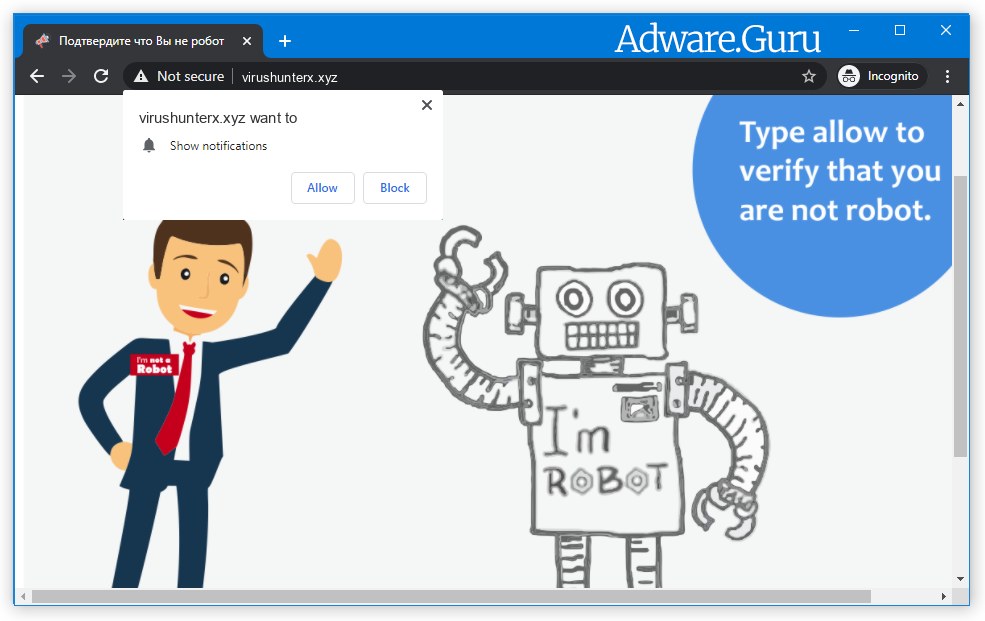
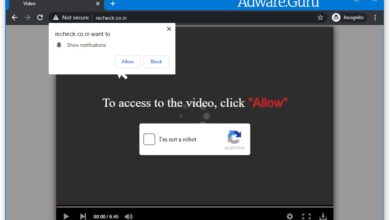
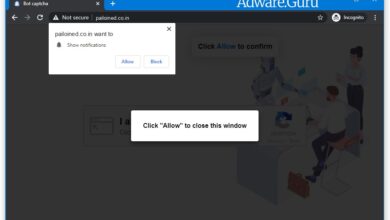
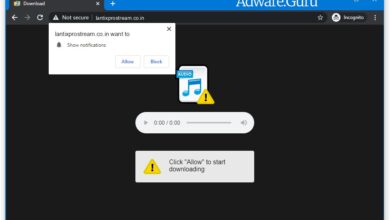
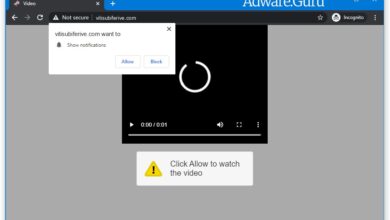
Virushunterx.xyz is not a required browser update, video player, or system message. It displays short fake prompts around the notification permission dialog so the request looks like part of opening content. These are examples of prompts that pages like Virushunterx.xyz may use:
Click "Allow" to watch the video
Click "Allow" to close this window
Click "ALLOW" to play the video
Stream and download available
To access, click allow!
If you are 18+ click allow
Type Allow to verify that you are not a robot
Click Allow to watch the video
Download is ready. Click Allow to download your file
Press Allow to verify that you are not a robot
Important: Do not click Allow on Virushunterx.xyz. If the site already has permission, it can show ads through browser notifications even after the original page is closed. Remove that permission first, then continue with the cleanup steps below if redirects or pop-ups continue.
Why am I seeing Virushunterx.xyz pop-up ads?
Virushunterx.xyz usually appears after an advertising redirect, a misleading download or streaming page, or a site that uses aggressive ad networks.
If it happened once, closing the tab and blocking notifications may be enough. If Virushunterx.xyz keeps appearing on trusted sites, check browser extensions and recently installed programs because adware may be reopening the redirect chain.
Here are common signs that adware or a browser hijacker may be present:
- Advertisements appear in places they shouldn’t be;
- Your browser homepage has changed without your permission;
- Your browser redirects to questionable sites;
- Web pages that you typically visit are not displaying properly;
- Browser pop-ups appear which recommend fake updates or other software;
- Other unwanted programs might get installed without your knowledge;
Use the guide below to block Virushunterx.xyz notifications and check the device for related adware.
How to Remove Virushunterx.xyz:
- Remove Virushunterx.xyz Automatically
- Remove Virushunterx.xyz From Programs and Features
- Delete Rogue Programs From File Explorer
- Remove Virushunterx.xyz Adware From Browsers
- Delete Virushunterx.xyz Notifications
- Get rid of Virushunterx.xyz pop-ups and notifications on Android
- How to Protect Your PC From Virushunterx.xyz and Other Adware
Remove Virushunterx.xyz Automatically:
The easiest method to stop Virushunterx.xyz ads is to run an anti-malware program capable of detecting adware in general and Virushunterx.xyz in particular. You may try GridinSoft Anti-Malware. It’s good at detecting and removing adware and other PUPs (potentially unwanted programs).

Other software that may be able to get rid of Virushunterx.xyz:
Note: After removing the adware you might still need to disable Virushunterx.xyz notifications manually (see the step named Delete Virushunterx.xyz Notifications).
You can also try to remove Virushunterx.xyz by hand using the following instructions.
Remove Virushunterx.xyz From Programs and Features:
Go to Programs and Features, uninstall suspicious programs, programs you don’t remember installing, or programs you installed just before Virushunterx.xyz appeared on your browser for the first time. When you are not sure if a program is safe, look for the answer on the Internet.
Windows 11:
- Right-click the Start button and select Installed apps.
- Find the suspicious or recently installed program in the list.
- Click the three dots button next to it and select Uninstall.
- Follow the prompts and restart Windows if asked.
Windows 10:
- Right-click the Start button and select Apps and Features.
- Find the suspicious or recently installed program in the list.
- Select it and click Uninstall.
- Follow the prompts and restart Windows if asked.
Windows 8.1:
- Press and hold the Windows key
 and hit X.
 - Select Programs and Features.
- Select the suspicious program.
- Click Uninstall.
Delete Adware App From File Explorer:
This step is for experienced computer users. You might accidentally delete something you weren’t supposed to. Sometimes malicious programs don’t show up in Programs and Features. Check also %ProgramFiles%, %ProgramFiles(x86)%, and especially %AppData% and %LocalAppData% (these are shortcuts; type or copy and paste them into the address bar of File Explorer). If you see folders with unfamiliar names, check what is inside and search the names before deleting anything. Delete only folders that are clearly associated with unwanted software. If you are not sure, back them up before deleting them. You can also use GridinSoft Anti-Malware to scan for and remove such files:
Remove Virushunterx.xyz From Browsers:
Remove suspicious browser extensions you do not recognize. You can also reset browser settings with GridinSoft Anti-Malware:
Remove Virushunterx.xyz from Google Chrome:
- Click on three dots menu button
 at the top right corner of the window.
 - Select More tools ⇒ Extensions.
- Click REMOVE to uninstall an extension.
- Click Remove in the dialog box.
Remove Virushunterx.xyz from Mozilla Firefox:
- Click on menu button
 and select Add-ons.
 - Go to Extensions tab.
- To uninstall an add-on, click on Remove button next to it.
Remove Virushunterx.xyz from Microsoft Edge:
- Click the three dots menu button at the top right corner of the window.
- Select Extensions => Manage extensions.
- Turn off suspicious extensions or extensions you do not recognize.
- Click Remove next to an unwanted extension and confirm.
Remove Virushunterx.xyz from Opera:
- Press Ctrl +Shift + E keys to open extensions manager.
- To remove an add-on, click on the x button next to it.
- Click OK when asked to confirm.
Remove Virushunterx.xyz from Safari:
- On the top menu select Safari => Preferences.
- Select Extensions tab.
- Select an extension you want to delete and click Uninstall button next to it.
Delete Virushunterx.xyz Notifications:
Remove Virushunterx.xyz Notifications From Google Chrome:
- Open chrome://settings/content/notifications (just copy this and paste into the address bar of Chrome).
- Delete all rogue notifications by clicking three vertical dots button next to each and selecting Remove.
Remove Virushunterx.xyz Notifications From Mozilla Firefox:
- Click on menu button and select Options.
- Select Privacy & Security on the left side of the window.
- Scroll down to Permissions section and click Settings… button next to Notifications.
- Find sites you do not want to receive notifications from, click the drop-down menu next to each, and select Block.
- Click Save Changes button.
Get rid of Virushunterx.xyz pop-ups and notifications on Android:
Disable Virushunterx.xyz notifications:
Note: Steps might differ a little depending on the version of your Android.
- Tap Settings.
- Select Apps & notifications => Apps.
- Find and tap the browser that displays Virushunterx.xyz notifications.
- Tap Notifications.
- Find Virushunterx.xyz in the list and disable it.
Stop Virushunterx.xyz redirects:
If Virushunterx.xyz keeps opening in new tabs, check recently installed apps and remove apps you do not recognize. You can also scan the device with Loaris Trojan Remover or another trusted anti-malware tool.
On Android, pop-ups and ads can also come from browser site permissions rather than an installed app. If notifications continue after blocking Virushunterx.xyz, scan the device with Trojan Scanner:
Open Trojan Scanner on Google Play
How to Protect Your Computer From Virushunterx.xyz:
- Keep Windows, browsers, and security tools updated.
- Keep Windows Firewall enabled or use another trusted firewall.
- Use a reputable anti-malware tool that can detect adware and potentially unwanted programs.
- Use a trusted ad blocker such as uBlock Origin, AdGuard, Adblock, or Adblock Plus to reduce malicious advertising redirects.
- Do not allow browser notifications on pages that ask you to click Allow to watch a video, download a file, prove you are not a robot, or close a window.
- When installing freeware or shareware, choose Custom or Advanced setup and decline bundled programs you do not need.
More pop-up removal help
Use these related Adware Guru resources if Virushunterx.xyz is part of a wider browser notification or redirect problem.
- Browser notification scam removal guide
- Latest pop-up ads and browser notification removal guides
- Remove Entivrio.com pop-up ads (Virus Removal Guide)
- Remove Html-load.cc pop-up ads (Virus Removal Guide)
- Remove Flowrentixcore.co.in pop-up ads (Virus Removal Guide)
- Remove Xnxxcom.co pop-up ads (Virus Removal Guide)
- Remove Itomaosa.co.in pop-up ads (Virus Removal Guide)